
Install guide
How to install MoonLoader in GTA San Andreas
The script engine for mods written in Lua. One zip into your game folder, about three minutes. By the BlastHack team.
Download MoonLoaderv.026.5 · 1.9 MB zip · blast.hk (official)
- About 3 minutes
- Free
- Only copies files
Before you start
What it does
MoonLoader runs mods written in the Lua language: .lua files in a moonloader folder. K-YOU is one of them. It's a plugin (MoonLoader.asi) with the Lua runtime (lua51.dll) and a library folder.
LiorMods mods that need it
Needs an ASI loader first, and on some PCs Microsoft's DirectX 9 runtime (see Troubleshooting).
Already have
MoonLoader.asi in your game folder? You have it. Skip to "Check it works".Install
- 1Download the MoonLoader zip straight from the official site: blast.hk/moonloader/download.php?archive. The link starts the download at once (about 1.9 MB), so you don't have to find your way around their Russian page.
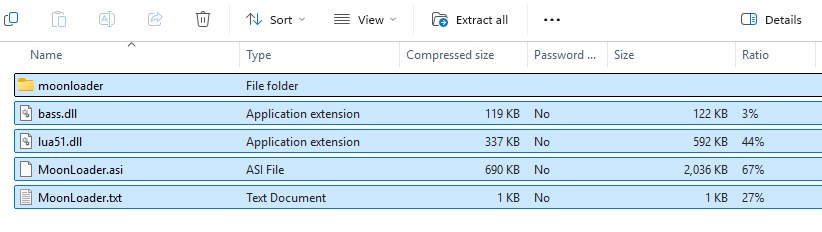
- 2Open the zip (double-click it), select everything in it (Ctrl+A) and copy it (Ctrl+C).
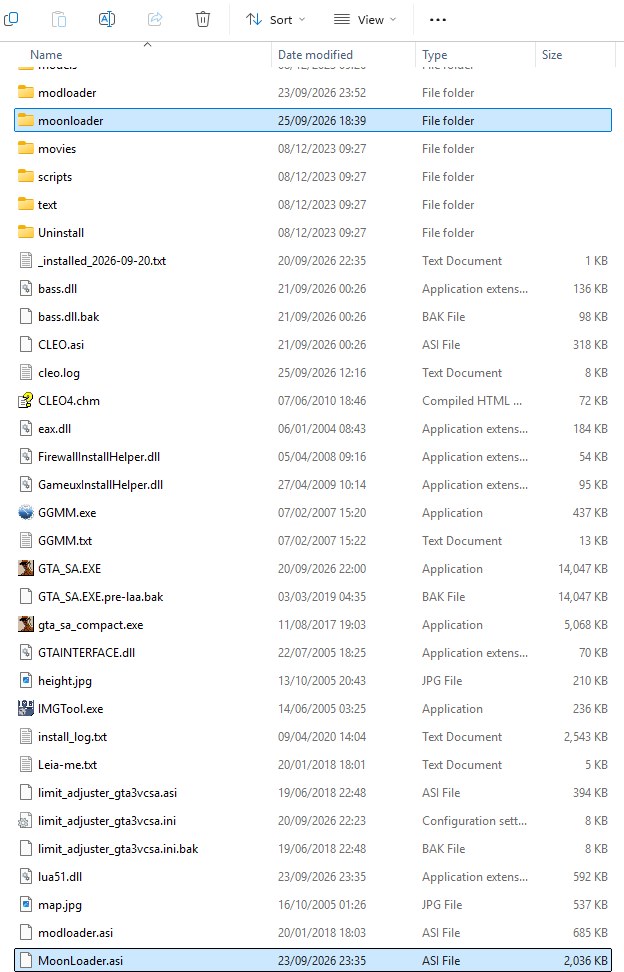
- 3Paste it into your game folder, next to
gta_sa.exe(Ctrl+V). - 4If Windows says
bass.dllalready exists (you have CLEO), choose the option that starts with Skip: CLEO's copy is newer.
Get the zip, not the setup installer from the same site: the installer isn't signed, and Windows may stop it.
Check it works
- Start the game once. A file
moonloader\moonloader.logappears, and it says MoonLoader v.026.5-beta loaded. - Lua mods go in the
moonloaderfolder, for example K-YOU'sk-you.lua.
Uninstall
Delete MoonLoader.asi, lua51.dll, MoonLoader.txt and the moonloader folder (your Lua mods are in it). Keep bass.dll if you have CLEO.